Showing posts with label Hi Res. Show all posts

Tuesday, 31 December 2019

SONY NW-A100TPS 40th Anniversary Walkman - For Old Time Sake


Did you grow up loving the Walkman? Are you missing the days of using a pencil to rewind or forward your cassettes in order to save battery life? Do you want to play all those cassettes you have stored in those old boxes? Well, you will not get to relive that with this SONY NW-A100TPS Walkman J

This is another SONY Digital Media Player (DMP) but with a touch of the first Walkman introduced to the world 40 years ago. Retails at RM 1,799, this 40th anniversary package comes with a 16GB media player running on Android (only 6 GB available space), USB C cable, stickers, manual and a soft casing resembling the first Walkman model TPS-L2.

Just like most of SONY DMPs, it is equipped with their proprietary DSEE feature, vinyl like sound processer, ClearAudio+, latest LDAC Bluetooth protocol and capable to play whatever digital format you install on this player including MQA.

Now, when SONY first announced about this special and limited edition couple of months back, I was not really interested as I have never gotten into DMP or DAP. Yes, I had a few including iPods, but once the mobile phone industry started to have very decent audio playback, I stopped using a DMP. SONY Malaysia was only allocated 100 units and consumer were advised to pre order them before 13th Nov. Myself however just got a hold on the unit on Boxing day. Why did I get one? Well, lets just say it was a gift.

The unit is veeerryyy light. I just cant believe how light it is. Didn’t impress me at all. Why make it light when you can have a behemoth DMP right? Wrong! It is meant to be light for great portability. First things first, I need to put in my 128 GB MicroSD card from my previous phone Samsung S9. Then, just like any Android phone, I downloaded TIDAL and Spotify. The set up for the unit is easy especially for Android user. Once it was all set up, the fun begins.

Hardware
Headphones– Nuraphones, Sennheiser HD800S, Beyerdynamic T1, Audeze EL8
Earphones – MF EB50, RHA MA750, Samsung AKG Buds, SONY WF-SP700N
External DAC amp – CHORD Mojo

I start off with my favourite track Take Five by Dave Brubeck DSD

MF EB50 - Not up for the task to deliver the bass that I like from this track. Sound kind of flat.

RHA MA750 - Didnt disappoint me. The MA750 have been my preferred earphones when it comes to musicality. Bass was adequate. The airiness of this track was definitely the highlight.

Samsung AKG Buds - Among the earphones, this was actually the highlight. Nicely matched with regards to musicality. The DMP connected nearly instantly and on this track, the overall track sounded full and the bass was astounding. A decent sound can be achieved at about 65% volume. The bass was extended and digs quite deep.


SONY WF-SP700N - Even though equipped with its own Sony app, it somehow missed the mark when compared to the AKG. It was still a fun pair to listen too but it sounded less musical and at times sounded a bit flat.

Nuraphones - Among the headphones, this was the one that was effortlessly delivering good overall sound given you activate the Nura apps. Bass was full, the airiness from the experience with MA750 was there and the musicality was very lively. On wired mode, it was not that impressive where you need to crank up the volume to about 75%.


Audeze EL8 was the only wired headphones that shows the least struggle for the TPS to deliver good sounding music to. Had to crank up the volume to 90% to have that bass impact I like on this track.


Dont even try with Beyer T1 and Senns HD800S. Even at 100% volume, it sounded thin and unlively completely.


CHORD MOJO - To connect or Not To Connect?

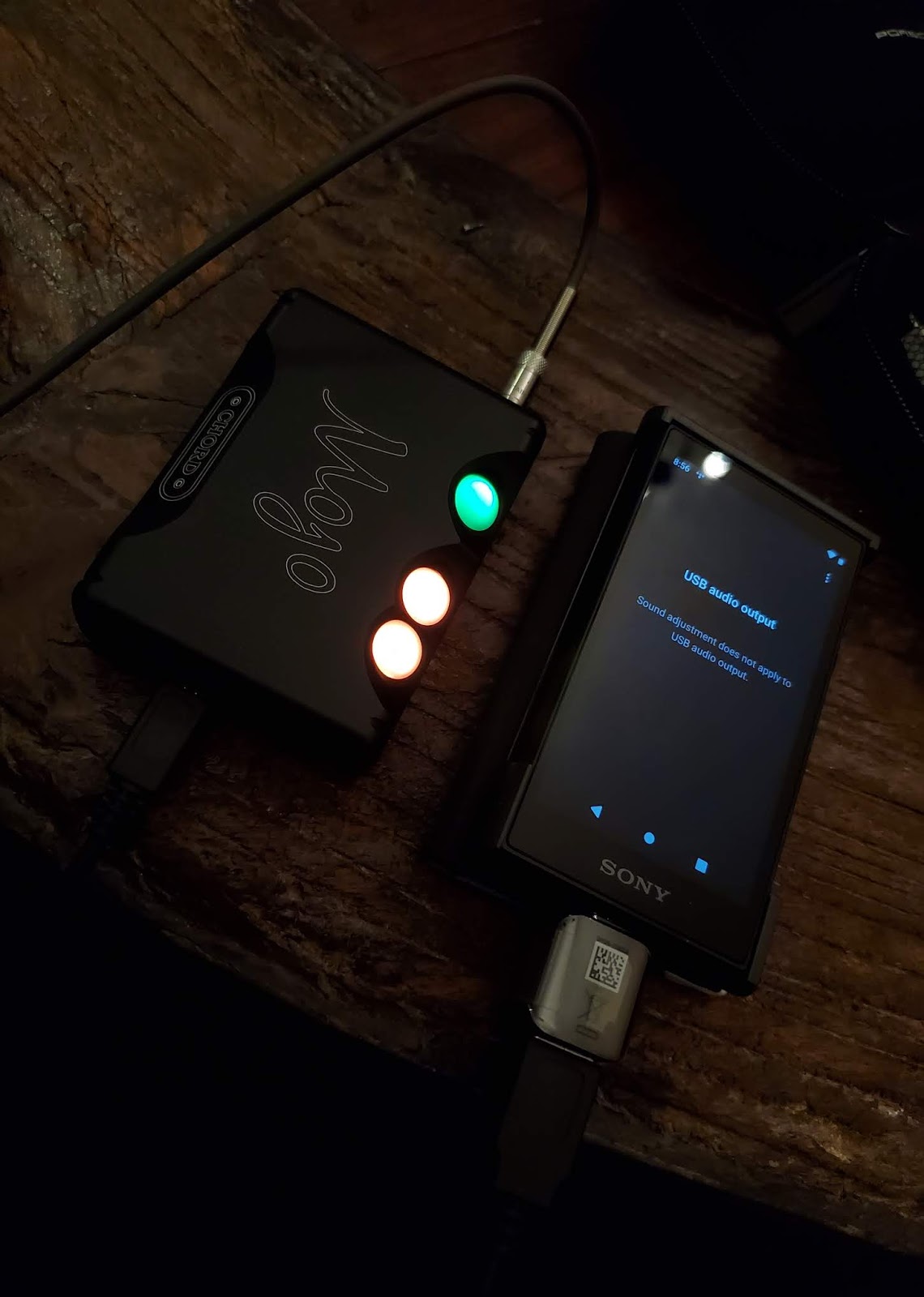
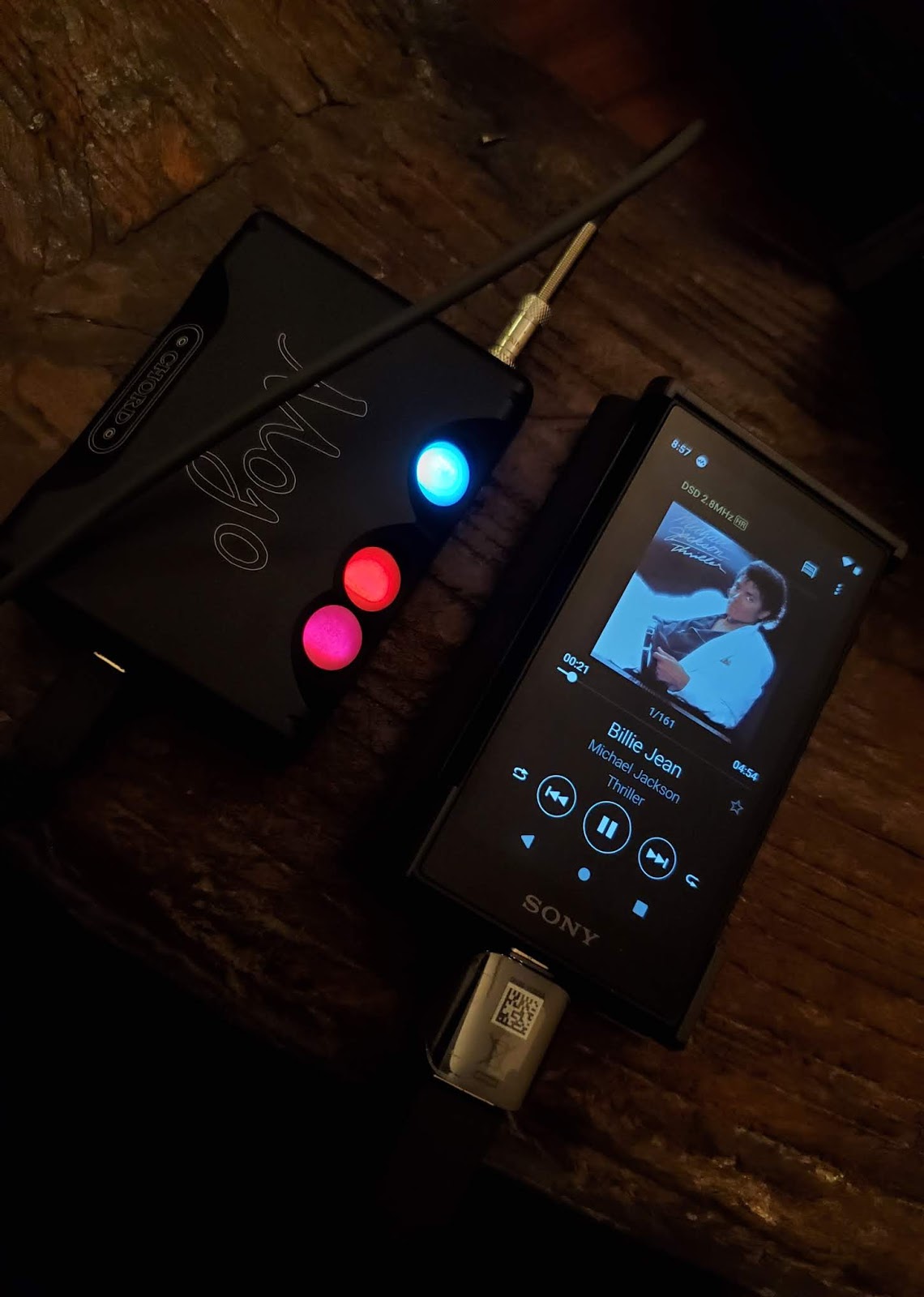
Big YES if you intend to use this DMP with headphones. It just not designed to drive headphones. Need a decent amplification to drive headphones whne playing from this player. No compatibility issue to connect OTG to this player and to the CHORD MOJO. It sounds out all the different hi res files I have and it was indicated by the different colours on the Mojo.

Connecting the DMP to an external DAC amp like the Mojo is definitely the way to go to fully enjoy headphones while playing from this Sony DMP.
Other Cool Features

Highly compatible to be connected to modern ICE. In my Mercedes E350, it was best paired in BT mode as I can then stream DSD files to the ICE. It can also be connected to the ICE system via Android Auto but you will need the APK file for that.


It can also play videos, movies etc with crystal clear images. The screen size to be frank although small was fun to use too. Can easily play mp4 and avi files. Sometimes I prefer the smaller units like this as it is less taxing on the arms.


THE CONCLUSION

Should you get one? If you base it purely on sound quality, this unit is featured pack with all the Sony gizmos to give you the purest of sounds quality. I am of course a big fan of its DSEE and Hi res capability having to own their main deck HAP Z1 ES. But is it value for money? Well, if you do have RM1799 spare change from Xmas or the upcoming CNY, then by all means get one. But with only 16 GB built in memory (with only about 6 GB available memory), it is not categorized as a value for money unit. The sale is banking on nostalgic element. Oh and by the way, I never owned the original walkman as it was damn expensive back then. I only had a Panasonic walkman. 

Saturday, 23 June 2018

SONY HAP Z1 ES - A No Nonsense Hi Res Audio Player Part 1

This player have been in my system for more than 2 years and it still amazes me how SONY engineered this masterpiece. Here in Malaysia, the unit is one of the unspoken hifi piece of equipment eventhough a number of audiophiles and reviewers does have at least one unit in their system. Some have 2 units.

I decided to do a feature on this unspoken unit and this is Part 1 as an introdution.


Saturday, 3 February 2018

Hi Res Audio - Think Tinker Board


It seems that streaming has already being accepted as a norm in the hifi world. While physical medium still rules the market, we can no longer deny that streaming has come a long way from those days of the stigma of 'if you can't hold it, then its not real'. Streamers can be owned at various levels. In the recent months, this particular petit streamer have making waves in the local scene. It is the smallest that I have reviewed so far. The Tinker Board is based on ASUS very own minimalist PC and Volumio set up to purely play music as the primary function. This Tinker Board was made more commercially available by Simon Sung in the local scene (at least from my FB feed). After seeing a lot of the usual suspects putting in this unit into their system, I started to wonder what this Tinker Board can do. And thanks to Simon, I get to experience streaming hi res music in a different way for about 3 weeks.


THE SPECS

The Tinker Board package by Simon comes in a 3 in 1 bundle together with the USB cable and and also iFi USB silencer. This is a plug and play unit with the following specs.
  • Minimal operating system, tailored for Bit-Perfect Audio Playback
  • Works with any USB 2.0 DAC
  • Raspberry PI and Odroid I2S DACs supported natively
  • Supports all filetypes: FLAC, Alac, Aac, Vorbis, Mp3, DSD etc
  • UPNP Playback
  • Airplay Playback
  • DSD Over PCM support, for non Direct-DSD compatible hardware
  • Integrated WebRadio directories
  • If a compatible wireless hardware is found, Volumio will create an hotspot network for first configuration
  • Mount CIFS and NFS Network Attached Storage, with an auto-discovery function
  • Custom playlist editing and creation
  • Plugin support with new functions available like Spotify and Digital Room Correction
  • Seamless update system: no need to reinstall when a new version is available
  • Multilanguage with a growing number of translations available
  • Image background support, even your favourite one
  • Alarm and sleep function
  • Item include:
    • 1 x Asus Tinkerboard
    • 1 x 8GB Micro SD card
    • 1 x Power adapter
    • 1 x Casing
THE SETTING UP

You can either connect the streamer via its mini jack (you will need a a 3.5 mm jack to RCA to connect direct to an amp) or via USB cable to an external DAC. I tried with both ways and for the latter, I connect it to Oppo Sonica DAC. It can only output either one at one time. The review here is based on direct analogue connectivity.

To control the unit, you need to download Volumio app from either Apple Store or Google Play. It costs me RM4.45 about USD 1. 

I also connected an ethernet cable to ensure a more stable connectivity even though it does have wireless capability.


The Volumio app reminds me of the Bryston BDP2 I reviewed many moons ago. Need a little bit of getting used to. Although it detected both my Western Digital NAS and also Sony HAP Z1 ES, it needs to scan and load the whole entire library the first time it is set up. This is all done via the app. For Spotify playback, a plugin is required to be installed. Again, this can be done via the app. All and all, it took me about 20 mins to set everything up.


THE COMPATIBILITY TEST
The first hour was just testing out different files from MP3 to ALAC to WAV to FLAC to DSD. All of them passed with flying colours. No issues at all. even the internet radio worked. I struggled a bit to set up the Spotify but after restarting the app and Spotify, it worked good.


THE STABILITY TEST

Similar to my previous reviews of Oppo Sonica and Arcam rPlay, this is one of the tests that I put through a sample unit. On wired mode, the Tinker Board worked flawlessly. No audio signal drop at all even when streaming DSD files. On wireless mode however, there was some buffering at times makes it a little bit struggling. The app control however was a little bit irresponsive regardless whether its on wired or wireless. Sometimes I am not sure whether the unit have received the command from the app or not and I re-clicked just to make the player to repeat the command twice.

On wired mode, the player was put on continuous playback for about 6 hours with no issues. I just had to wait for my library to be loaded initially but then, it played on random for a good 6 hours without being disconnected.


THE SESSION

The following tracks were used for this session similar to my review on Oppo Sonica DAC

1. Louisiana 1927 by Aaron Neville (16/44 ALAC)
2. Somewhere, Somebody by Jennifer Warmes (2.8 MHz DSD)
3. Take Five  by Dave Brubeck (2.8  MHz DSD)


Lousiana by Aaron Neville connected to Oppo Sonica DAC

Coupled with the Oppo Sonica, the Tinker Board sounded very airy and created quite a huge ambient in my hall. Its actually quite a good pairing between both of them if you like your sound to be big. Comparing the sound against direct analogue connection between the Tinker Board and amp, the Tinker Board provided a more upfront sound. Detail and clarity seems to be its virtue as the overall track sounded more controlled and focused towards Aaron's vocal.

On the Somewhere, Somebody track, the bass does not dig deep as oppose to connecting it to Oppo Sonica. However, it does provide a more solid twang on the bass line, a more natural and soothing to the ears. The percussion is more raw but quite enjoyable while Jennifer's vocal sounded  much more natural and upfront, like she is singing solely for me. Some may say that it sounded bolder than when connecting it to Oppo Sonica.

Playing Take Five reconfirms that the Tinker Board is more about details and clarity. I dont get a hard hitting bass line but a more soothing and natural bass line that can create the emotional ambient in a different level. It gives a more enveloping experience without a thudding experience in your face. The wind instrument sounded more focus and upfront, similar experience to the first 2 tracks I tested.

SO...DO I GO WIRELESS OR WIRED OR DIRECT USB?


I highly recommend to go wired on this unit if you are connecting this to your main hifi system versus a desktop set up. The wired mode provides better stability and also sounds much more engaging compared to wireless. Even better, play your music by connecting your USB thumbdrive directly into one of the four USB ports on this unit.


OTHER PERFORMANCE


Using Spotify was quite straight forward eventhough I experienced some hiccup in the beginning.  The SQ is not as per playing a real digital file but it delivers its duty to stream from online portal with great capability. 


CONCLUSIONS


At RM450 (unit alone) or RM 900 bundled with the above USB cable and ifi silencer, this Tinker Board unit must be the most minimalist-strictly-audio streamer in town. Now, as per what Tony says, Anyone Can Stream! If you have the following but dont know whether streaming is your thing, try this unit out.
  • Hi Res files either on USB HDD or NAS
  • Spotify account
  • Don't want to spend a fortune on streamer

Contact Simon Sung on Facebook or on Whatsapp +6012 4549923


Sunday, 24 December 2017

ARCAM rPlay Music Streamer - Minimalist But Effective


........and here is my review published on audiofi.net


+ For its clarity, full bodied sound and minimalized design
- Signal drop on wireless mode and cluttered app


Sound: 8/10

Value: 7/10

If one to talk about streaming music about 10 years ago, it would either end up to be a laughing matter or a heated debate. Today, every other digital hifi component is equipped with technology to cater for streaming needs. From standalone DACs to portables to media players, most of the products are now able to meet the requirement. The demand is also extended towards AV products. Of course, each type of hifi kit, may it be an amp, a CD player or turn table, comes in various ranges. Same goes to streamers.

The rPlay is the latest offering from ARCAM under their rSeries family. I purchased one of their earlier rSeries product in 2010 which was a standalone DAC called rDAC and it was a sitting in my system for a few years before I got into Hi Resolution audio. The rPlay comes in the traditional mini sized (194 x 44 x 124 mm) enclosure with minimal buttons and LED indicator on the front and top panel. Weighing just slightly over 1 kilogram, this unit must be one of the smallest streamer I have ever seen.

Don’t be fooled by its size though. This unit is capable of not only streaming various digital files (WAV, MP3, AAC, FLAC etc) from your PC or NAS on your home network up to 24 bit / 192 kHz, but also incorporates major online streaming services like Spotify, TIDAL. Deezer, Amazon Music, Napster and also Internet Radio. Besides that, it also offer the Apple based fan the Airplay function to stream directly from your Apple products like iPad, iPod and iPhone.


On the circuitry side, it comes with a built in Texas Instrument PCM5102 DAC, hence it is actually a plug and play device. You can connect it directly to your amp, and once set up, you can stream music directly without the need of a separate DAC. However, ARCAM is generous enough to offer an SPDIF output if you fancy to further explore higher grades DACs. The unit also offers both variable and fixed outputs so you have a choice to use its internal digital volume control with a power amp or connect it to your integrated amp.

SETTING UP
Although it’s a plug and play unit, user will still need to set up the communication with the home network. Once you have plugged in the power supply and RCA interconnect, download the DTS Play-Fi app from either Google Play Store or Apple App store. It is recommended that the network cable to be used at this stage as you may have to download a firmware update which can take about 10 minutes. I experienced some issues in setting up when the unit is on a wireless mode. The app will then bring you through step by step on how to link the rPlay to your network. Once you have done this, you will be able to see any PC or NAS made available on the app. For myself, my network consists of a Western Digital NAS and Sony HAP Z1ES internal HDD.


The network interface for the rPlay seems to be more stable when it is on wired mode. I experienced signal drop outs on certain occasion especially when playing higher resolution files. This is even when my wireless router is just 2 feet away and it is in a clear line of sight.

THE LISTENING SESSION

On Here We Go Again (WAV 24/192), the rPlay ability to present soulful vocals of Norah Jones and Ray Charles was the highlight of the review. Jones’s vocal sounded seductive while Charles’s sounded very deep with the typical slightly husky moments. It was one of the sessions that allow you to close your eyes and imagine that this duet is performing live in your living room. With the right level of clarity, the sound of the soft wire brush and rim shot on the snare created quite a soothing atmosphere and when the keyboard kicked in, the energy level of the track was raised nicely by the rPlay. Comparing to another streamer I owned about 5 years ago, this track can sound quite flat with no emotions can be felt from the duo. The rPlay seems to manage to deliver quite a remarkable details from good recording like this one.


The piano introduction on Strange Meadow Lark (WAV 24/96) by Dave Brubeck Quartet was very warm and the rPlay just built the tempo of the track nicely. By the time the saxophone and percussion comes in, the rPlay gave an even a more convincing performance whereby the mids and highs of this track are quite transparent and provide a substantive soundstage.


With the track For No Apparent Reason by Anouar Brahem (WAV 24/192), there was no doubt that the rPlay can belt out the deep diving bass that this track could offer. The clarity of the guitar plucking can easily mesmerize listener with no sign of fatigue that one might experience on prolong playback of digital files. The background vocals (or humming) further confirmed the level of soundstaging the rPlay can provide. It sounds huge compared to the size of the unit.


How about heavier music like Enter Sandman by Metallica on FLAC 24/192? The rPlay belted out this track with quite a bang. Again, details and clarity seems to be its forte. It brings out the various frequencies of highs, mids and lows with good level of transparency. Quite neutral I would say.  The rPlay however does not bring out the same impact when MP3 files are played. It sounds flatter and compressed. Playing the MP3 version of this track did not give out the same energized adrenalin-pumped experience.

On Spotify, in general, the sound is pretty decent but it will not be sufficient to fulfill the audio quality standard that one would expect from a high resolution audio. The DTS Play Fi app will also link the Spotify app on your phone or table to its own interface.


THE LAST WORD
Music streaming has become a norm now regardless of how other formats are maintaining their share of the industry. The rPlay offers quite a bargain with most of the available online streaming service available on this unit. It also allow playback of higher resolution digital files to show its full potential. With good quality digital files, the rPlay will be able to deliver quite an honest presentation of music into your system. One drawback however is the inability to play DSD files. If there is a way to allow future upgrades to DSD, this unit would be even more attractive.

The app seems to be a bit cluttered and unorganized. It did however worked flawlessly including extracting the metadata and artwork of the files and display it on the interface.


 If you wish to have a simple and basic introduction to streaming digital files, the ARCAM rPlay might be the answer for you. It’s a frill free device that delivers good quality audio reproduction from your digital files library especially if you have high quality recordings.

GEAR
Musical Fidelity M6i integrated amp
Western Digital NAS
Sony HAP Z1 ES NAS
ProAc Response D18 speakers
Blackberry KeyONE on Android


Gear
Sources: Western Digital NAS, Sony HAP-Z1ES, Blackberry KeyONE on Android / Amp: Musical Fidelity M6i integrated / Speakers; ProAc Response D18
Price: £400
Malaysian price: RM2,590
Malaysian distributor: A & L Audio Station (+603-2282 9884) / WhatsApp + 6014 8222 333)


Saturday, 9 September 2017

Sony HT-MT500 soundbar – better for music


Here is my review featured in Audiofi.net

+ Engaging subwoofer, flawless wireless connectivity and Hi-Res audio. Minimalist design.
– Lack of HDMI input, fiddly remote, uninvolving surround.
Sound: 7/10
Value: 7/10

OWNING a home theatre system has become more affordable, but the challenge of space is still the main issue faced by most AV enthusiasts. The soundbar, an alternative to the conventional surround set-up, was introduced to the market back in 1998. Today, the soundbar has come a long way, with updated features to complement ever-growing digital technologies.
Earlier this year, Sony launched a new series of audio products which included the soundbar featured here, the HT-MT500. It is a 2.1 channel compact soundbar that is intended for the minimalist. At just 50cm in length x 6.4cm in base and height, it is easily comparable to the size of any decent centre channel speaker.
The system includes a separate wireless subwoofer designed to operate horizontally or vertically. It is slim enough to be placed under a sofa and has a special feature called Sofa Mode to optimise the bass response and avoid bloat.
However, the compact housing does not mean Sony has slimmed down on the features. The MT-500 offers three inputs – optical, 3.5mm aux in and a USB port, on top of wireless LDACTM Bluetooth and WiFi connectivity. However, there is only one ARC equipped HDMI output to connect to your TV to aid in controlling and setting up the sound bar.
With no HDMI input, note that there is no video signal pass through.
On top of these, this soundbar is also touted as meeting Hi-Res Audio specifications. One unique feature, to me, is the proprietary LDAC Bluetooth connectivity which allows three times higher data transmission over conventional Bluetooth. LDAC can maintain maximum bit depth and frequency range of 24-bit/96kHz during transmission. Big difference compared with a near-CD quality down-converting transmission.
Although this is a 2.1 channel system, the soundbar comes with an S-Force PRO Front Surround to virtually recreate the surround sound, for HT enthusiasts who want a more immersive movie experience.

SETTING UP
Unpacking was an easy, one-man affair. You will need two AC points, one for the soundbar and one for the subwoofer. Connect a HDMI cable from the soundbar to your TV, turn the soundbar and subwoofer on, and voila, the system connects wirelessly.
The same with Bluetooth and online music streaming services such as Spotify and Chromecast. Using your mobile phone or tablet, just follow the step-by-step instructions and you will be enjoying wireless music within a few minutes. The NFC feature allowed me to connect my Sony Xperia XZ by just tapping the unit with my phone.
Connecting to my home network was also easy and quite similar to any commercially available audio player. Once connected, the soundbar will be able to scan through any NAS (or in my case, my 1TB built-in Sony HAP-Z1ES high-resolution audio player) for all available digital files.
Not much calibration needs to be done except for the subwoofer volume, which is actually a handy feature to get the right amount LFE, not only for the movies but also stereo audio playback.
LISTENING
As Pirates of the Caribbean: Dead Men Tell No Tales was showing at the cinemas at this point review, I decided to re-watch the first installation, The Curse of the Black Pearl.
I had to connect the Oppo UDP 203 4K BD player via optical in order to enjoy a Dolby Digital or DTS MA sound. With the subwoofer volume set at “8”, the LFE was sufficient to feel the grunt of canon shots from the pirate ships. I placed the subwoofer at the rear part of my hall and I must say, the wireless connectivity was flawless. There was no delay between the sound and the bass impact.
The soundbar reproduced a high clarity dialogue channel. Even during a noisy action scene where canons were shot, the dialogue channel remained clear with the voices of Captain Jack Sparrow, Barbosa, Will Turner and Elizabeth Swan. Long gone are the days where soundbars suffered from compressed dialogue.
Although the system delivers quite a fulsome frontal sound, the surround effects somehow did not create the immersive, cinematic ambience that I experience from dedicated surround speakers. The overall sound can be heard to be coming from the front including the surround sound itself.
Moving to two-channel audio for music gave me a better perspective of the offerings of this system. I can’t compliment enough on Sony’s connectivity effectiveness. I could easily browse through my high-resolution music collection on the 1TB HAP-Z1ES located downstairs. Within seconds, I got to hear the playback of DSD files via this soundbar.
Having played wireless streamers for nearly 10 years, I find that this soundbar streams big DSD files effortlessly over the home network compared with some other hi-fi brands. No drop in signal, so more fun to listen to.

Playing Dave Brubeck’s Time Out, I found that the soundbar system dug quite deep when it came to bass extension. As two-channel music reproduction does not need surround effects, the delivery of the hi-res content was quite impressive. The soundbar easily filled my hall with good audio quality. To further confirm what I heard, I then switched to LDAC Bluetooth connectivity via my Xperia. Playback of the same DSD track from my phone was more in-depth and alive.
With the DSEE HX upscaling features, playback of some 320kbps MP3 files on a thumb drive also benefited from quality restoration. I Just Can’t Stop Loving You by Michael Jackson sounded more refreshing with the compression taken away. Even the low volume intro of the song can be heard with better ambience. I believe that even Spotify playback benefits from this DSEE HX engine.
THE LAST WORD
If you are looking for a simplified, music-first-movie-second solution for your home, give this soundbar a shot. Although dialogue clarity is exceptionally good coming from a small box, I must say that I am leaning more towards stereo audio as the strength of the HT-MT500. Given it is equipped with DSD playback capability and the DSEE HX engine, I can happily do some easy listening of my audio collection for a few hours. I do believe this system works better in a moderately sized room and not in larger living rooms.
Based on the manual, there is an option to add a pair of wireless dedicated surround speakers. Maybe with this, the HT-MT500 soundbar will become a more complete alternative package to a full blown home theatre set-ups.
Gear
Oppo UDP 203 4K UHD Blu-ray player. SONY HAP-Z1ES HDD audio player, SONY Xperia XZ mobile phone, Samsung UA65HU9000 65-inch Curve TV
Price: £549
Malaysian price: RM2,699
Review unit courtesy of Sony Malaysia (+603 77251101).

Sunday, 10 January 2016

MELCO High Resolution Digital Media Storage/Player: For The Purist


Digital media player have been around for a number of years now. For yours truly, it all started back in 2007 with the basic Apple Airport Express, streaming CD quality ALAC, WAV, MP3 from my laptop to a mini hifi in the kitchen. Laugh all you want, but most of the digital audio system owners out there, at one point, have played around with iTunes. After going through two laptops screen turning blue, I wanted to have a computer free based system. From mobile phones to tablets to ipods, I went through several revamps. The hifi and music market have slowly getting onto the bandwagon with the introduction of high resolution music and also so called PC free media player. Naim, Olive, Cambridge Audio, Musical Fidelity are among the first companies that introduced their players. The music industry on the other hand have started to introduced higher resolution music in FLAC and DSD format. I settled with a Musical Fidelity M1 CLiC digital media player, streamer, DAC, pre amp all in one.

After the media player 'standard' have been established, the industry have started to look into the quality of  streaming and also physical storage of the digital files. I have tried both wireless and wired set ups. While CD quality files are OK, I still prefer wired set up for high res files playback. Same goes for the medium storage type. I store my music and movies on both a Western Digital HDD toaster connected via USB and a NAS connected to my home router via a network cable.

Now, 8 years down the road, I am introduced to 3 new enhancement elements in this CD-less digital playback.
1. Linux based operating system
2. Audio dedicated hard disk
3. Network port filter

And all these came in this unit by Melco.

WHAT IS IT?

Melco calls it High Resolution Digital Music Library. I call it The Next Breakthrough in Hi Res Audio. What can it actually do one may ask. It stores and plays any digital audio files including DSD.

HOW IS IT CONNECTED?

Two main methods are available:

1. Via network cable to a media player where Melco only acts as storage device and do some network filtering.

2. Via USB cable to a media player with built USB DAC where the Melco does the playback and send digital signal to the USB DAC.


I have connected the unit in both ways to my Musical Fidelity M1 CLiC.

PRODUCT FEATURES
  • Dedicated LAN port for Player (Streamer) connectivity - optimum data integrity and simple setup.
  •  Light-piped Ethernet ports - complete electrical isolation totally removing possibility of interference and noise.
  •  LAN LED off function - ensures the highest possible data integritY
  • No PC required for setup and installation - no specialist knowledge needed.
  • Specific IP port for Streamer / Player with additional Network port for Control and Ethernet. Simply creates robust network for streaming high resolution music and control even on complex networks.
  • Pre-installed media server - no configuration required.
  • Supports multiple specialised media servers - currently shipping with Twonky 7 with DSD support.
  • Informative OLED front panel display - displays current streaming track data, system status, and setup,
  • Simple menu navigation structure and track selection
  • Simple front panel on-off switch - just like Hi-Fi.
  • 15 seconds only to full power-on.
  • 5 seconds to full shut-dowN
  • Safe against unintended power down - no requirement for UPS
WHO IS MELCO?

Melco was known to be a turntable manufacturer. They now have turned into data storage giant that has built an audio oriented NAS drive that gives streamers a real shot in the arm.

Melco actually stands for Maki Electronics Laboratory Co. They were set up in 1975 to make high mass turntables with outboard motors and silk thread drives along with line level preamplifiers.  They then moved into IT and computer products and became Buffalo. 

THE SET UP

  • Melco N1A with 2 x 2 TB HDD
  • Musical Fidelity M1 CLiC DAC and Pre Amp
  • Musical Fidelity M1 PWR Power Amp
  • 1 TB Western Digital NAS
  • Full range DIY bookshelf speakers
  • Siltech RCA interconnect between CLiC and PWR
  • Supra USB cable between Melco and CLiC
  • Stock network cable
  • Apps on Android
    • Bubble UpPnP
    • Linn Kinsky
    • Project Streambox
THE TRACKS

  • Sibok Kitak Nangis by Zee Avi (MP3 48/320kbps) - on WD NAS
  • Have You Ever Seen The Rain by CCR -  24/96 FLAC on 16 GB thumbdrive and Melco N1A
  • Enter Sandman by Metallica - 24/96 FLAC on 16 GB thumbdrive and Melco N1A
  • You're My Best Friend by Queen - DSD on Melco N1A

THE SESSION

Zee Avi's masterpiece sounded airy with more evidence of detail and clarity when played via the Melco N1A. The soft percussion sounded fuller compared to playing it directly from WD NAS via CLiC. By feeding it through the Melco via the network cable, it somehow opened up the track to more detail and free flowing airy sound.  

The ever famous Rain song by CCR was even more fun to listen to. The 24/96 FLAC file was transferred onto the HDD on the Melco and I let the CLiC play that file by accessing it via the network cable. Comparing it with the same file but played from a 16 GB thumbdrive connected directly to the CLiC by USB input, I find that playing it from the Melco via the network cable was livelier and present a less digital sounding track. The bassline on this song sounded bold yet still melodious. The vocals of course was naturally growling but in an emotional kind of way. Definitely, the sound is impacted by where the digital file is being stored.


Enter Sandman however was a bit of disappointment. Playing it via network from the Melco, the track sound a bit thin compared to playing it on the CLiC directly from the thumbdrive. Lar's double pedal was little bit too laid back and James's vocal was overshadowing the music. Did not get the Wow factor that I was expecting from this metal masterpiece. It still have that adrenalin factor when Kirk did his solo but overall, I prefer playing metal hi res tracks straight from thumbdrive.

Now for DSD, I had to use the Melco to play back that digital file as the CLiC, being a unit nearly 5 years old, does not have the capability to play DSD files. Hence, Melco played the file and fed the signal to the CLiC via USB DAC and in DoP mode. DSD is definitely a different level of hi res listening. Between the MP3, 24/96 FLAC and DSD, The DSD depth of music is more engaging. The Melco unit did a fine job in playing back the file. This is my favourite Queen's track and it was definitely presented in a more detail manner and with a bigger spatial and depth ambience. The vocal of the late Mr. Mercury sounded more melodic and livelier compared to the FLAC file I have.

HOW DO YOU CONTROL THIS UNIT?

This unit does not come with a physical remote. The front fascia does come with a few buttons to perform setting changes but not to choose track.

For playback, an app needs to be downloaded via Android or iOS. However, Melco does not have it own app hence you need to download either Linn Kinsky or BubbleUpNP. I tried controlling this N1 unit via both Android and iOS with no issues.

Choosing tracks is very convenient as the internal HDD as the directory is set up with various folder options even up to type of file you have on the the unit.


HOW DO YOU GET THE FILES ONTO THE MELCO?

In essence, if you remove all the functions, this unit becomes a dedicated audio NAS. Hence, if you turn on your Mac or Windows PC, you will see Melco as one of the available network drive. From there, it just drag and drop exercise of your available music files.

Secondly, you can also transfer files using a thumbdrive via the front USB port of the unit. Just stick your thumbdrive and the unit will ask whether you want to transfer the files.

Thirdly, Melco also have arrangement with two hi res website companies where you can purchase the music via your tablet, phone or computer and then the Melco unit will downloiad it directly onto the hard disk.

SOUNDS PERFECT?

For a hi res player, I am convinced that this is the best player I have heard so far, sound wise. Bear in mind, I have only heard Linn, Naim, Musical Fidelity, Cambridge Audio, Bryston, Oppo, Logitech and Apple AE.

As there is no perfect hifi in the world (I think we come up with this theory to give us a reason to upgrade :) ), I find that there are a few things that Melco should have included in the design.

  1. Wireless module. Although I agree that wired sounds better, I could not use this unit with my usual review set up upstairs because my NAS and router is downstairs.
  2. Physical remote. If my network is down, there is no other way to control this unit.
  3. Soft touch button on the front would make this unit even sleekier compared to the heavy industry 'clickety' button.
  4. A real shuffle mode playback. I could not shuffle All Track at the main root directory. The unit also requires me to choose tracks and put it in the playlist first before playback. Sometimes I just want to press the play button and let the player randomly choose songs.
CONCLUSION

Purely looking at the audio quality supremacy, now I understand why Melco named this unit as High Resolution Digital Music Library and not a streamer or media player. Its sonic benefit is from the properly engineered and audio dedicated circuitry, HDD and the Linux based system. It is indeed a unit that offers hi res fans a true to date very high quality playback of their precious digital files.

Go for this unit if you are looking for a big step up in your quest for hi res nirvana and maybe give the black disc cult run for their money :). However, if you are looking for a lifestyle streamer, looks elsewhere. This unit is for hardcore and serious hi res set up without the need of a running computer.

I also managed to listen to the SSD model in a very impressive set up of a friend whom is also the person who have made this review possible. The fun part for me is the fact, Melco have yet to set out the plan for introducing this to the Malaysia market at this time of print. Consider this review as a sneak peak of Melco possible plan to be in Malaysia.